Nine years ago, I wrote What are the important problems in UI engineering? Real-time multiplayer data synchronization was the most important but hardest one, requiring expertise, corporate spending, and some design tradeoffs to get right.
Today, you can just build multiplayer user interfaces for hobby projects, using tools that are one npm install away. My favorite is Automerge, an awesome piece of software for building data models that are local-first, multiplayer-safe, and versioned.
This post describes building a fairly novel UI on top of Automerge:
- what just works
- what extra bits of effort were required
- my advice for getting started
Aside: This post is an experience report, not a tutorial, so I highly recommend looking at Automerge’s homepage animation, the docs overview, and at least the first page of the tutorial to learn more about Automerge. From here on out, I’ll assume you have a basic idea of what it’s for.
Context
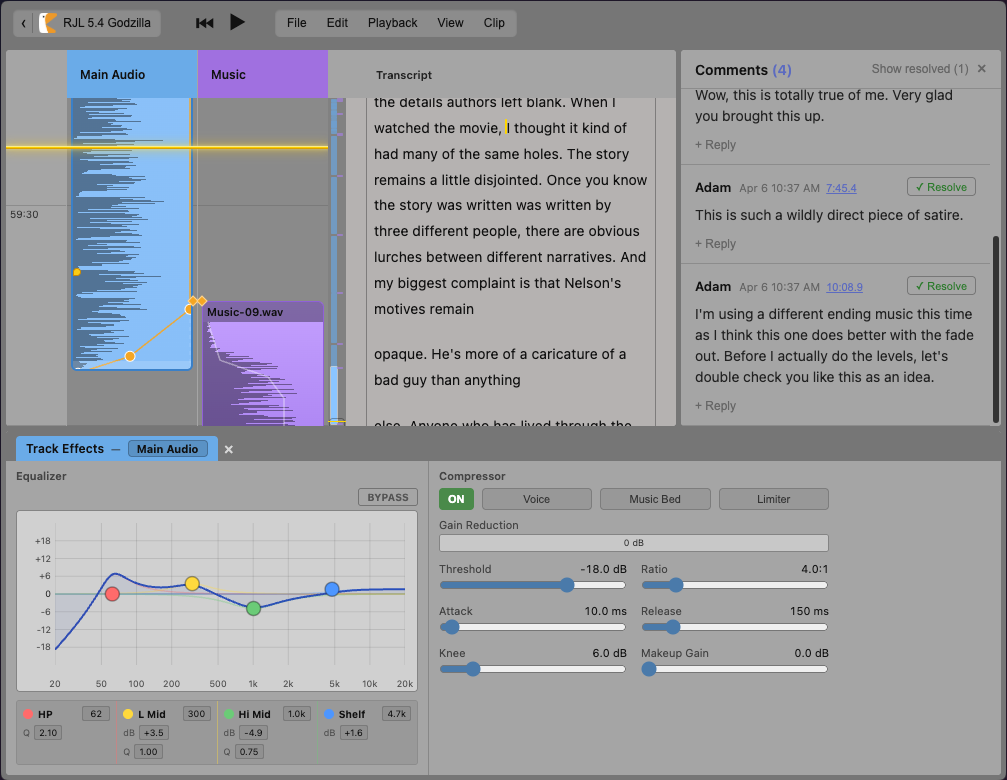
I spent the last few months building Ducking, a browser-based, multiplayer audio editor tailored for my partner’s podcast.
The previous blog post described the unique UI design and audio layout model that makes it a much more pleasant way to put together an episode. Those improvements made a single editor more effective.
But what we really wanted was a more collaborative workflow. It’s ridiculous that audio editing is stuck in a twenty-year-old world of single-player desktop apps and emailing files back and forth. We wanted to work together as easily as in Google Docs or Figma: one of us editing some clips, while the other fixed the transcript or tweaked the EQ settings. Plus we wanted modern collaboration tools: comments, history, and tracked changes.
I was able to build that, thanks to Automerge. You could too.
Working with Automerge
All of Ducking’s data, aside from the audio blobs, lives in Automerge documents.
The core pattern of working with Automerge will be familiar to any React developer. You fetch data with a hook, render it as you like, and dispatch asynchronous requests to change it. After the data changes, the hook triggers a re-render. This is very similar to React’s normal useState patterns. Automerge’s version just happens to also persist the data locally, maintain history, broadcast to collaborators, receive updates from the network, and resolve conflicts — all without the UI needing to know.
import { useDocument } from '@automerge/react'

type Episode = { title: string }

export function EpisodeEditor({ docUrl }) {
  const [doc, changeDoc] = useDocument<Episode>(docUrl)
  if (!doc) return <p>Loading…</p>

  return (
    <>
      <input
        value={doc.title}
        onChange={(e) =>
          changeDoc((d) => { d.title = e.target.value })
        }
      />
    </>
  )
}
The data update operations look distinctly un-React-like. The API has you write imperative-looking code, which seems to be directly modifying objects and arrays. But they are not quite the native JS objects and arrays you are used to: they support fewer methods and don’t actually mutate the data immediately, instead they intercept their own mutations to turn into changelist items in the document history.
For simple purposes, Automerge just does what you need. But it isn’t magic. Its invariants don’t always match your desired semantics without careful design. This makes it very important to carefully consider the data model, so that:
- most semantic user actions correspond to single operations provided by Automerge
- separate user actions on related data have natural resolutions in terms of the invariants of the corresponding Automerge operations
- stored canonical data is clearly separated from calculated derived data
To make this more concrete, let’s look at two examples from my experience building Ducking:
- one case where I had to improve the data model to get the right behavior
- another case where Automerge didn’t provide the guarantees I needed, so I had to work around it
Data modeling for multiplayer
In Ducking’s data model, a clip is a window that plays back part of an underlying, immutable audio source. It knows which part of the audio to play, can apply effects to transform the audio, and holds an appropriate amount of space in the project timeline.
The most common effect is for the clip to scale the volume of the underlying audio over time, either to cross-fade it with other audio or to remove an unwanted noise in the recording.
When I first started building Ducking, each clip had a list of time-indexed volume levels, with the times being relative to the start of the clip. But most volume changes are really about the underlying audio, not the clip itself, so when the clip was adjusted to start a little sooner, all the volume changes also applied to different parts of the audio. Since everything was working other than that scenario, the obvious fix was to write some code that updated all the volume timestamps whenever the clip’s start time changed. But that was a bad idea.
Suppose two collaborators concurrently edit the clip’s start time. Each edit bundles changes to the start time and to every volume automation timestamp. Automerge has no way to see the causal relationship between those changes, so when it merges them, it might resolve to a jumble.
This is a typical example where Automerge will run into problems: one semantic user action is trying to update lots of pieces of persisted data in a causally-related way that the CRDT itself doesn’t understand.
The solution in this case isn’t hard: I migrated all the data about audio effects to be relative to the underlying audio’s timeframe, rather than the clip’s. That way they don’t need to be updated when the clip’s start and duration change. If multiple editors are changing the clip’s start time, volume automation, and other effects, they are now independent and likely to merge correctly.
This is a pattern I ran into a few times. One data representation makes sense until you add a new operation, which makes clear that you’ve actually been persisting one piece of data that combines two independent concepts.
- In a single-player UI, you might leave a previous data model in place when adding new features and just do some extra calculations at write time to make it work.
- With multi-player UIs, it is far more common to have to migrate the data model to keep all the persisted data orthogonal.
Sometimes that means updating the shape of the persisted data and adding new read-time derived data calculations to satisfy the existing contracts. I have learned to strongly prefer write-time simplicity and read-time calculations to make the most out of Automerge’s auto-merging.
My advice is to accept that you will need to migrate the shape of your data as you build. Bake in some time to write a data migration early on, just to get used to it and not be scared of the first big one. There are patterns for doing it at read-time in the client as well as batching upgrades on the server. If you can find a convenient invariant to check that things are the same before and after, your life will be much easier. For Ducking, I did an export of the audio of every project before and after a migration and used an audio fingerprint to check that none of them had changed. This made it very non-frightening to ship even big schema changes.
Implementing list re-order
Now we know that sometimes we’ll have to massage our data model so that user actions naturally map to Automerge’s operations. But what happens when Automerge just doesn’t provide a guarantee we need?
Sometimes we have to write application-layer code to provide stronger invariants than Automerge gives us.
I ran into this case when implementing Ducking’s magnetic timeline, which is an ordered list of clips to be played. While Automerge provides array operations for removing and inserting items by index, it doesn’t provide an operation to atomically re-order existing items in the list.
There is a known solution to this problem: Martin Kleppmann published a paper on adding atomic list reorder operations and another, together with Liangrun Da, on “Extending JSON CRDTs with Move Operations”. There is even a draft PR to add it to Automerge, but it hasn’t been merged yet.
The naive version of list reorder is to just delete the object from its current index and then add it back at the destination index. But the invariants provided by those two operations don’t actually combine to the invariant I wanted: that under lots of concurrent reorders, the object should exist exactly once in the list. Instead, multiple concurrent deletes and adds might result in it existing at multiple places in the list.
To provide the “exactly once” invariant at the application layer, I built my own list reorder operation. First, the clip gets a semantic id when it is inserted into the timeline. Then when a reorder happens, it triggers the delete and insert operations, as above. But at read time, the application scans for duplicates of the semantic id and arbitrarily picks the first non-deleted one, while ignoring any others. This ensures the object is only in the list once and that multiple readers always reach the same conclusion about the end state.
In building Ducking, list reorder was the one operation I needed that Automerge didn’t provide. Hopefully the PR will merge soon so that this case for application-level logic goes away.
Document history
A good multiplayer UI needs good history management tools. Collaborators want to see what’s changed since they left, comment on the diffs, and be able to compare and roll back to old versions.
Automerge tracks the version history of the document and provides some great primitives for dealing with document history and comparison, but application developers still have to decide how to surface that information and what concepts to present to users.
I highly recommend reading Ink & Switch’s Patchwork lab notes, which have a lot of interesting experiments. I particularly enjoyed their work on exposing branches to users and universal comments. There’s a lot more exploration to do.
For Ducking, I settled on a fairly simple collaboration and history model:
- a linear version history with user-defined named “checkpoints”. Checkpoints become the grouping mechanism for changes, the unit that we discuss, diff, and roll back
- comment threads that could be tied to points in the audio, regions in the transcript, or version checkpoints
We haven’t yet had sufficient reason to introduce branches, but I could imagine it being useful in the future.
Text and marks
Working with rich text is a tricky problem, especially if you want to add custom application logic on top of editable text. I highly recommend reading the Peritext paper, which has a bunch of examples and animations that explain the challenges of both rich text and building multiplayer software in general.
Automerge’s rich text schema includes marks: annotations that apply to ranges of text and stay consistent as the text itself is edited. Marks are most commonly used for text formatting like bold or italic. But you can also create your own types of marks specific to your application.
Custom marks are incredibly useful. Ducking uses them in two places today:
- Tracking regions in the transcript that were the subject of comment threads.
- Tracking the timestamps of words in the transcript, while still allowing edits. The transcription service saves the transcript into Automerge as a richtext object where each word has a mark with its timing information. If there is a small typo and an editor needs to fix just that word, the mark stays in place and all the timing information is retained. If a whole sentence needs to get fixed, some of the intermediate marks get removed, but the marks at the beginning and end of the sentence are retained and so we have at least rough timing information.
One limitation of marks is that their datum has to be a simple value, generally a string, and doesn’t get multiplayer merged. This gives rise to a couple patterns:
- When there is a small bit of immutable data, like the transcript timing information, I serialized JSON to a string.
- When the data itself is more complex or mutable, like a comment thread, I just stored an id on the mark that pointed to the actual data living elsewhere in the document.
Marks provide a great foundation for building application features on top of multiplayer rich text. If you read the Peritext paper and internalize the marks model, you’ll definitely find creative ways to apply it.
So there you go: Automerge made it easy for me to build a multiplayer podcast editor. I am very grateful to Ink & Switch and the open-source contributors for building it. It still feels like magic that it’s just out there, one npm install away.
What’s next
This is part two of a three-part series about building Ducking.
- In part one, I described the unique UI design of the software.
- In this post, I hope I convinced you to look into Automerge and that you could build a hobby multiplayer project with it.
- In the upcoming final part, I’ll reflect on the experience of building Ducking. I used LLM assistance, not to intensify the work, but to buy myself more sketching and hammock time. I also enjoyed building narrowcast software that only has to please a few people.
About me
I’m Adam Solove, a product engineer formerly at Stripe and Figma. I love to build great products in complicated domains. I’m just wrapping up a six month sabbatical that focused on my local community and building some deeply personal tech experiments like the one above.
I’m starting to look for projects or my next role. If you’re building something interesting, please get in touch.
Anticipated questions
What about the audio data?
While all the multiplayer data is stored in Automerge, the underlying audio blobs don’t belong in Automerge and need their own handling so that we can play them back quickly.
My goal was for a new collaborator to be able to start listening and editing within four seconds of loading the page: faster than starting a desktop app, and much faster than downloading the whole project as a file. The challenge is that an hour-long podcast episode might rely on roughly a gigabyte of audio: four hours of high-quality studio recordings plus effects and background music.
So Ducking has to do a lot of work to make cold startup fast. On upload, the audio service needs to:
- back up the raw original audio
- transcribe any speech to show in the transcript view
- generate waveforms to show in the timeline view
- slice it into short windows so that if an episode only uses 1m of a 40m recording, most clients only have to download one or two small slices
- transcode the slices into a compressed format, so the app can immediately play a useful-but-lossy version, even as the higher-quality audio is downloading in the background
The UI data layer needs to intelligently follow the user’s intention and manage loading both faster versions of immediately-needed data and the full-quality versions of all the audio actually used in the project. Fortunately, the browser’s IndexedDB API is really useful for the multi-tiered cacheing and content-addressable storage we need. Plus it automatically manages eviction, so the data stays around if you use it and disappears if you don’t.
With all that processing and local cacheing out of the way, the rest of the UI can assume fast random access to the audio and focus on providing a great UI and editing workflow.
Why build a server and browser UI, not a local-first app?
I love local-first apps like Obsidian that work entirely without a server. And I especially love when local-first provides a credible exit path while also having a paid experience relying on cloud services.
So I started building Ducking with an option for a Tauri app with local file-system storage and optional-only server syncing. I built the UI in terms of a data interface that could be supplied by either a server or the local app. That seemed like solid insurance that no future funding could tempt me to use lock-in to make the app more profitable.
And then I decided this wasn’t a SaaS, it was just a thing I wanted to use with my partner and a handful of other friends. So the incentive to mistreat it went away, the costs to run it forever went down, and I just settled on building it the easiest way possible.
Once I got down to a ~3s total cold start time for being able to join and start playing back a project, it was so cool that I didn’t want anyone to have to waste their time downloading and installing a native app.
I hope that audio apps can skip straight from the desktop-only world they live in now to the local-first with sync options world. It would be great to avoid a decade or two of SaaS lockin in the middle. But I guess we’ll see.
Is Automerge secure and web-scale? Should I use it in my startup?
I — joyfully! — don’t know. That’s not a no, it’s just that I literally can’t tell you.
When I started in the industry, multiplayer real-time editing without conflicts was magic. Ten years ago, there were known solutions for specific problems, but they required a funded team and expertise in several different disciplines to be worthwhile to build. Today, I can download a dependency, build my UI in a mostly straightforward way, and have real-time collaboration with my friends.
There is something amazing about what used to be industrial-grade magic now being freely available to purpose-built tiny apps.
As for security, for now Ducking is protected through limited network access and then an authorization step when creating the websocket connection to the Automerge server. Users can’t discover or edit projects that haven’t specifically invited them. Attributing edits and comments to users happens in a way that is only partly secure and depends on my friends not being jerks. It would take some careful design work to add finer-grained permissions, such as comment but not edit, edit only part of a project, or discoverability.
The folks at Ink & Switch are working on Keyhive, which provides a cryptographically-secure capability-based access control model. That will be super cool and make it easier to share Automerge apps publicly with untrusted users, but it isn’t ready yet.
Is Automerge better than … ?
Other solutions in this space include Yjs. I cannot help you evaluate which one is right for you. The timeless advice is: think hard about your problem, do some back-of-the-napkin math about what limits you might run into, try building prototypes using several alternatives, and be honest with yourself about whether maybe the problem you have isn’t very hard and doesn’t need the newest, fanciest solution.
As for Ducking, a quick prototype and browsing the docs made it clear that Automerge was mature and performant enough for my use-case.
More importantly, the Ink & Switch ecosystem calls to me aesthetically. I like that Automerge isn’t just a sync and versioning engine, but instead one part of a larger vision to make software more secure, collaborative, malleable, fun, and personal. I want Keyhive and other of their projects to succeed. I hope that their work will enable the proliferation of small but magical software built just for a few people.
Thanks to Al and Kevin for reading an early version of this post and providing feedback.